Last Updated: 12th July, 2024 | 01:35:35 PM
NOUN Students Registration Portal
NOUN Students Registration Portal Procedure for New Students and NOUN Returning Students
Step 1 - Go to the noun online registration portal => www.nouonline.net

Step 2- At the Nouonline website homepage. Click on the 'STUDENT LOGIN' menu button

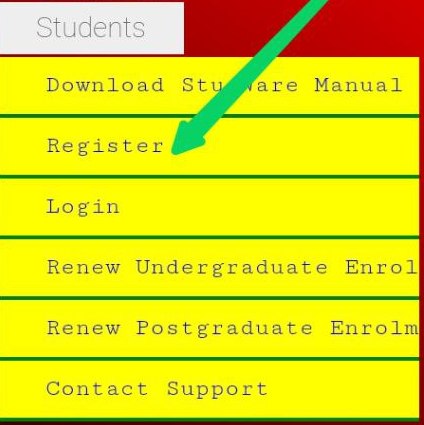
Step 3 - From the New Nouonline Portal menu buttons, Click the 'REGISTER' button

Step 4 - Fill the displayed Noun students registration portal form and click the 'SUBMIT' button. Note that all form fields are required and must be entered correctly.

Points to Note When Inputting NOUN Online Registration Form Values
- Your Noun student matric number and email address must be writing in small letters, and enter your surname and other names in CAPITAL LETTERS.
- You may change your noun portal password straightaway but not your email address. Only the Noun staff / Administrator can update registered emails.
After Completing NOUN Students Portal Registration Form
- Perform the step 1 - 3 again
- On the provided space. Enter your Matric Number, Password and Click the 'SUBMIT' button to log into your Noun student portal.

What to do next...
- Upload Recent Picture to your Portal
- Pay Semester school fees to register noun courses and examinations registrations.
- Print your student I.D card
- See New Matriculation Date
- Download Noun Course Materials
- Review NOUN TMA Timetable
- Download Exam Timetable
You may like
- NOUN Admission Requirements
- NOUN Study Centre
- NOUN Whatsapp Group
- NOUN School Fees Calculator
- NOUN Personalized Timetable
- NOUN Exam Summary
- NOUN TMA Solutions
- NOUN Past Questions
Related Posts

The National Open University of Nigeria, NOUN Courses and Pr...
17th December, 2025
Registration Procedure for Returning Students of NOUN...
12th July, 2024
.jpg)
NOUN Portal Registration Guidelines For New/Returning Studen...
27th March, 2025
Categories
Blog Posts






Breaking News
We usually sends BREAKING News to students of National Open University, NOUN. Not to miss any of our latest updates, enter your email here